Phone behind you, still
Behind the spot you shoot from, facing the goal. A bag or a bottle holds it. More
Whole goal in the picture
Shoot from where you normally do, like the edge of the box (16.5 m). Put the phone a few steps behind the ball and go back until the whole goal fits. We haven’t tested an ideal distance yet. More
Phone opposite your run-up
Run in from the left? Phone a little to the right. Then your body doesn’t hide the ball after the strike. More
60 fps, sound on
60 frames a second makes the strike easier to read. The sound of the strike helps us find each shot. More
Send the original
Pick the video in Files, or use AirDrop or Google Drive. Chat apps shrink it. More
Say the zone
Right after each shot, say where it went: 1 to 9, “over” or “wide”. More
Where should the phone go when you film a shot?
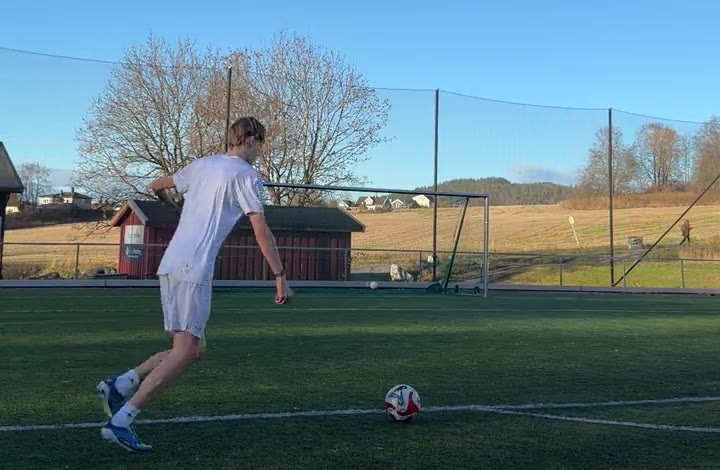
Behind the spot you shoot from, facing the goal, a little to the side. A tripod is easiest. A bag or a water bottle against the phone works too. What matters is that the phone doesn’t move during the shot.
Put it on the other side of your run-up. If you run in from the left, the phone goes slightly to the right of the line from the ball to the goal. Otherwise your body ends up between the phone and the goal after the strike, and hides the ball. In one five-shot session of ours, that happened twice.
How much of the goal needs to be in the picture?
All of it, with the ball and your run-up. The analysis needs to see the ball from your foot until it stops. Go back until everything fits, with a little space around the goal.
What are the best video settings for filming football?
1080p at 60 frames per second, with the sound on. A hard shot travels almost a metre between frames at 30, and half that at 60. The sound of the strike and the ring of the post help us find and check each shot.
On iPhone: Settings › Camera › Record Video › 1080p HD at 60 fps. In the camera’s video mode you can also tap the frame rate at the top. On Android the setting is in the camera’s video settings, and its name depends on the phone.
How do you send a video without losing quality?
Send the original file. Messaging apps and shared albums shrink videos, often to 720p and 30 frames per second. Pick the clip from Files, or send it with AirDrop or Google Drive. On iPhone you can save a video from Photos to Files with Share › Save to Files.
Keep each clip short: up to 30 seconds per shot, or one video of all your shots up to 5 minutes. We cut a long video into shots.
Why should the ball lie still before each shot?
The analysis finds each shot from a ball at rest. Let it lie still before you shoot, keep the phone still, and keep other balls out of the picture. Spare balls in the picture can look like a shot. Film your misses too.
How do you call out where the ball went?
Say the zone right after each shot. The goal has nine zones, numbered like a phone keypad, seen from behind:
If it missed, say “over”, “wide left” or “wide right”. Your voice gives us an answer to check the analysis against.
Before your session
A 30-second test clip Take three shots and call each zone. Can you see the ball from your foot to the net every time? If not, move the phone further from your run-up side.Questions about filming your shots
Do I need a tripod to film my shots?
No. Anything that holds the phone still works: a bag, a water bottle or the fence behind the goal line. The phone must not move during the shot.
How far from the goal should I shoot?
From where you normally shoot. Our test shots were taken from the edge of the box, 16.5 metres out, with the phone a few steps behind the ball. We haven’t tested an ideal distance yet. What matters is that the whole goal is in the picture.
Should I film at 30 or 60 fps?
60 fps if your phone has it. A hard shot travels almost a metre between frames at 30 fps and half that at 60, so the strike and the flight are easier to read. 1080p is enough.
How long can a clip be?
Up to 30 seconds per shot, or one video of all your shots up to 5 minutes. We cut a long video into shots.
How do I send a video without losing quality?
Send the original file. Pick it from Files, or send it with AirDrop or Google Drive. Messaging apps and shared albums often shrink videos to 720p and 30 fps.
Should I film my misses too?
Yes. A miss shows as much about your technique as a goal does.
Filmed your shots?
Send them in. One usable clip gets you a free month when we launch.
Send your shotsSweetspot is in beta. The analysis is experimental, and a person checks every analysis before you get it.